Instructors Version Logo
latest

Nano Degree Program

  • Experience the Technology of the Future and Coding
  • Overall Lecture Explanation
  • Coding Practice for Experience
  • Robot Coding Practice
  • Introductory Mission

Experience new AI robot technology

  • Experience new AI robot technology
  • Robot Controls Examples
    • Introduction
    • How to operate using the joystick
      • DIY / MINI Robot
      • ARM Robot
    • ROS Topic Examples
      • Follow Along!
        • ROS Topic Publisher
        • ROS Topic Subscriber
      • Explanation
        • Topic
        • Nodes
        • Publisher
        • Subscriber
    • ROS Sensors Examples
      • Follow Along!
        • IMU
        • LIDAR
      • Explanation
        • IMU
        • LIDAR
    • Mission
      • Accessing Isaac Sight
      • Checking Visuals
    • Discussion
    • Q&A session
  • AI Image Recognition Examples
    • Introduction
    • AI Image Recognition using GoogleNet
      • Follow Along!
      • Overall Explanation
        • Overview
        • GoogleNet
      • Coding Explanation
      • Mission
      • Discussion
    • AI Image Recognition using AlexNet
      • Follow Along!
      • Overall Explanation
        • Overview
        • AlexNet
      • Coding Explanation
      • Mission
      • Discussion
    • How are GoogleNet and AlexNet?
    • Mission Project
      • Writing Python Program as a Team
    • Q&A session
  • SLAM and Navigation
    • Introduction
    • Basic Features
      • Map
      • Pose of Robot
      • Sensing
      • Path Calculation and Driving
    • Theory
      • Slam Theory
        • Particle filter
      • Navigation Theory
        • Costmap
        • AMCL
        • Dynamic Window Approach (DWA)
    • Mission
      • How to do the Mission
        • Constructing a Map (as a Team)
        • Mapping the Constructed Map
        • Executing Navigation
        • Team Competition
      • Other Mission Examples
        • Get coordinate information, Send to desired coordinate
        • Map Examples
    • Discussion
    • Q&A session
  • Basic Robot Arm Control
    • Follow Along!
      • Before Starting
      • Moving the Robot Arm
      • Read Servo Motor Angle
      • Controlling Servo Motors
    • Code Explanation
      • Overall Explanation
      • Robot arm Movements
      • Basic Movements
      • Reading the Current Angle of the Servo
    • Mission Project
      • Libraries used for this Mission
        • mission_lib custom Library
        • event_name custom Library
      • Lets Start the Mission!!!
      • Pick up an object and place it somewhere else!
    • Discussion
    • Q&A session

New approach to beginner coding education

  • New concept experience! Introductory course for beginners in coding
  • Pose/Gesture Estimation & Object Detect Examples
    • Body Pose Estimation with Pose-ResNet18-Body
      • Follow Along!
      • Overall Explanation
        • Overview
        • Pose-ResNet18-Body
      • Coding Explanation
        • Major Functionalities
        • Minor Functionalities
      • Mission
        • Writing Custom poseNet Program
        • Executing the Custom Program
        • Let’s Change the Overlay!!!
      • Discussion
    • Object Detection with SSD-Mobilenet-v2
      • Follow Along!
      • Overall Explanation
        • Overview
        • SSD-Mobilenet-v2
        • Other models for Object Detection
      • Coding Explanation
        • Major Functionalities
      • Mission
        • Writing Custom detectNet Program
      • Discussion
    • Q&A session
  • ROS Command Examples
    • Follow Along!
      • ROS Command Example
      • ROS Service Server
      • ROS Service Client
    • Explanation
      • ROS Command Line
        • 1. rosnode command line tool
        • 2. rostopic command line tool
        • 3. pm2 command line tool
      • ROS Service
        • 2. Service proxies
        • 3. Calling services
        • 4. Providing Services
    • Mission
      • Accessing Isaac Sight
      • Checking Visuals
    • Discussion
    • Q&A session
  • Intermediate Robot Arm Control
    • Follow Along!
      • Dancing with the Robot Arm
      • Gripper Control
      • Robot Arm teaching
    • Code Explanation
      • Teaching the Robot Arm
    • Mission Project
      • Libraries used for this Mission
        • mission_lib_pnp custom Library
        • event_name_pnp custom Library
      • Lets Start the Mission!!!
      • Pick up objects and place them automatically!
    • Discussion
    • Q&A session

AI Robot Application & Utilization Academy

  • AI Robot Application and Utilization Academy
  • Driving the Robot Examples
    • Follow Along!
      • Movement Instructions
      • Movement with Odometry Information
    • Explanation
      • Odometry Information
    • Coding Explanation
      • Robot Movement
        • Initialization
        • Sending commands
        • Combining the movement instructions to a single python function
      • Odometry Information
        • Odometry calculation
        • Starting the Calculation
    • Mission Project
    • Discussion
  • sematic seg & Depth estimation Examples
    • Sematic Segmentation Examples
      • Follow Along!
        • CityScapes
        • Outdoor (off-road)
        • Segmenting Human Images
        • Variaty Objects and People
        • In-Doors
      • Overall Explanation
        • Overview
        • FCN-ResNet18
      • Coding Explanation
        • Major Functionalities
        • Minor Functionalities
      • Mission
        • Writing Custom segNet Program
        • Executing the Custom Program
      • Discussion
    • Depth Estimation Examples
      • Follow Along!
      • Overall Explanation
        • Overview
        • FCN-MobileNet
      • Coding Explanation
        • Major Functionalities
        • Minor Functionalities
      • Mission
        • Writing Custom segNet Program
        • Executing the Custom Program
      • Discussion
    • Q&A session
  • Advanced Robot Arm Control
    • Follow Along!
      • Tracking a Color with the Robotic Arm
      • Tracking a Face with the Robotic Arm
    • Code Explanation
      • Overall Explanation
      • Tracking a Color
      • Tracking a Face
    • Mission Project
      • Draw a Circle with the Robot Arm
        • Libraries used for this Mission
        • Lets Start the Mission!!!
        • Draw a picture with a robot arm!
      • Draw a Square with the Robot Arm
        • Libraries used for this Mission
        • Lets Start the Mission!!!
        • Draw a picture with a robot arm!
      • Draw a Triangle with the Robot Arm
        • Libraries used for this Mission
        • Lets Start the Mission!!!
        • Draw a picture with a robot arm!
    • Discussion
    • Q&A session

Future Industry: AI Robot Academy

  • Experience the future industry! AI Robot Academy
  • AI Model Refinement Examples
    • Tao Peoplenet Examples
      • Follow Along!
      • Overall Explanation
        • Overview
        • PeopleNet
      • Coding Explanation
        • Major Functionalities
        • Minor Functionalities
      • Mission
        • Writing Custom segNet Program
        • Executing the Custom Program
      • Discussion
    • Tao Dashcamnet Examples
      • Follow Along!
      • Overall Explanation
        • Overview
        • DashCamNet
      • Coding Explanation
        • Major Functionalities
        • Minor Functionalities
      • Mission
        • Writing Custom segNet Program
        • Executing the Custom Program
      • Discussion
    • Tao Facedetect Examples
      • Follow Along!
      • Overall Explanation
        • Overview
        • FaceDetect
      • Coding Explanation
        • Major Functionalities
        • Minor Functionalities
      • Mission
        • Writing Custom segNet Program
        • Executing the Custom Program
      • Discussion
  • AI Robot Competition Project
    • Follow Along!
      • Dancing With Music!
    • Code Explanation
      • Sound
    • Mission Project
      • Libraries used for this Mission
        • time and Arm_Lib Library
        • os Library
      • Lets Start the Mission!!!
      • Make Your Robot Dance to the Music!
    • Discussion
    • Q&A session
Instructors Version
  • SLAM and Navigation
  • Theory
  • Navigation Theory
  • Edit on GitHub

Navigation Theory

Navigation is a methodology which ascetains ones position as well as the most optimum route for a pre-determined destination. For navigation system for our robot we need to have

  1. Costmap for obstacle detection

  2. AMCL for adaptive localization

  3. DWA for obstacle avoidance planning and avoiding obstacles

Costmap

In navigation, the costmap is responsible for calculating obstacle are, possible collision area and a robot movable area based on the pose of robot, sensor values, obstacle information, and the occupancy grid map optaind as a result from SLAM. There are two type of costmap:

  1. Global Costmap: (path planning for the global area of the fixed map)

  2. Local Costmap: (path planning and obstacle avoidance in the limited area around the robot)

Although these two are different in application, the representations are the same.

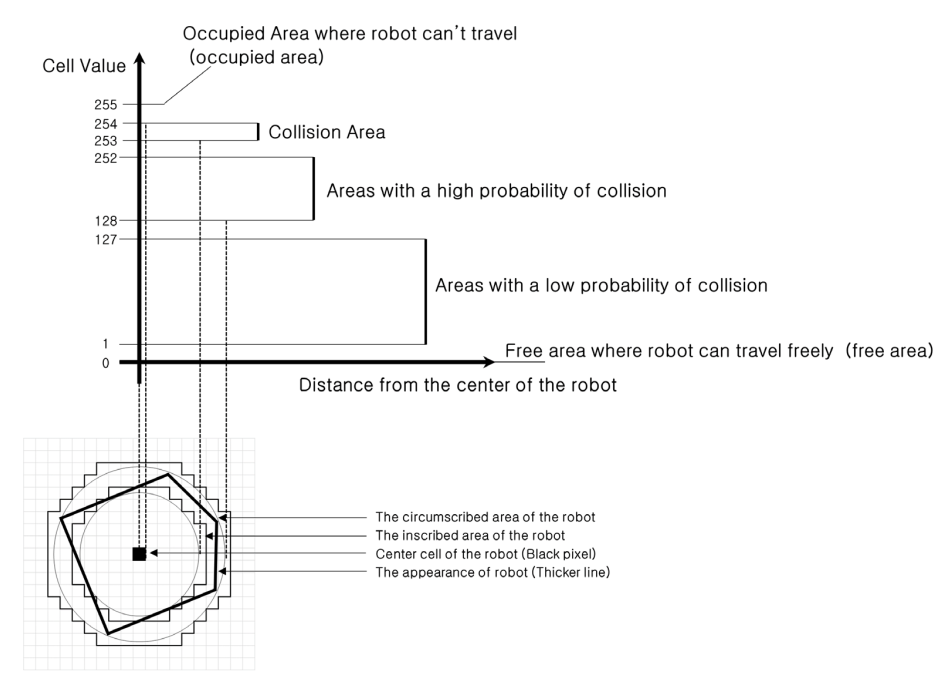
The costmap is expressed as a value between 0 and 255. These values show whether the robot is movable or colliding with an obstacle. The calculation parameters for these values are predetermined within our zetabot.

  • 000: Free Area where robot can move freely

  • 001~127: Areas of low collision probability

  • 128~252: Areas of high collision probability

  • 253~254: Collision area

  • 255: Occupied area where robot can not move

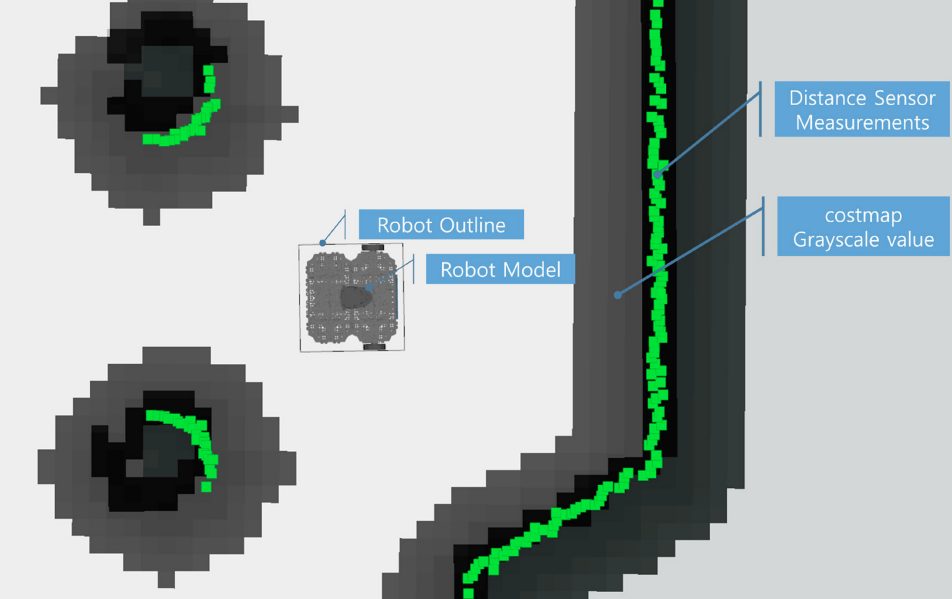
We may also visualize the costmap value with gray scale. The darker the pixels get, more likely there is an obstable. The green points represent obstacles found using the distance sensor.

AMCL

Within our SLAM theory, we discussed about the Particle Filter, the Monte Carlo localization (MCL) pose estimation algorithm. The AMCL (Adaptive Monte Carlo Localization) is an improved version of MCL that allows for reduced execution time with less number of samples.

The basic goal with Monte Carlo Localization is to locate where our robot is in a given environment. That is we must get the X, Y value as well as the angular value of the robot on the map. For these purposes MCL algorithm calculates the probability of the location of the robot.

First, the belief (posterior probability using Bayesian update formula) of the location is calculated using the (X, Y, Angle) values as X_0, distance inforamtion obtained from the distance sensor up to time t as Z_0 and movement information obtained from the encoder up to time t as U_0.
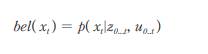

We must include hardware errors within our calculation, hence establish the sensor model and the moevement model.

With the models established, predict and update the Bayesian filter.

Prediction

Within this step, the position of the robot at the next time frame is calculated using the established movement model (which is a probability of x in relation to the hardware error), belief probability at the previous position and the movement information from the encoders.


Update

For update step, we use the established sensor model probability which includes the hardware error, belief probability of the current position and normalization constant eta.
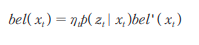

With this, we have the general locational probability belief of our robot. We can start the particle filter and generate N particles using the calculated probability bel(x_i) of the current position. With MCL algorithm the we go through a Sampling Importance weighting Re-sampling process with our samples instead of particles. For AMCL, we extract a new sample set using the robot movement model at the probability belief of the previous position. For these new sample set, the weight is calculated using the distance inforamtion, and normalization constant eta.
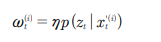

And in our resampling step, we create N samples of new X sampling (particle) sets using the new sampled x set and weight calculated for the new sampled x set.


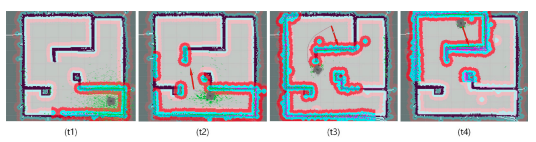
When this process is repeated, while the robot is moving, the proabbility of the estimated robot position increases in accuracy. For example, on the image below, we can see the converging location from t1 time frame to t5 time frame. All this process is referred to as “Probabilistic Robotics”.
Dynamic Window Approach (DWA)

Dynamic Window Approach is a method for obstacle avoidance planning and avoiding obstacles. That is, a method that will quickly reach a target point while avoiding obstacles that can possibly collide with the robot.

In DWA the robot is not represented in X and Y coordinates but rather in the velocity search space with translation velocity v and the rotational velocity w as axes.
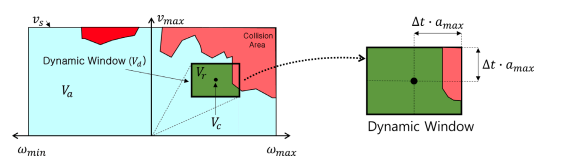

Within the velocity search space, the robot has a maximum allowable speed due to hardware limitations and this is called Dynamic Window.

v: Translational velocity (meter/sec)
w: Rotational velocity (radian/sec)
Vs: Maximum velocity area
Va: Permissible velocity area
Vc: Current velocity
Vr: Speed area in Dynamic Window
a_max: Maximum acceleration / deceleration rate
G(v, w) = v(a·heading(v, w) + b·dist(v, w) + c·velocity(v, w)): Objective function
heading(v, w): 180 - (difference between the direction of the robot and the direction of the target point)
dist(v, w): Distance to the obstacle
velocity(v, w): Selected velocity
alpha, beta, gamma: Weighting constant
v(x): Smooth Function

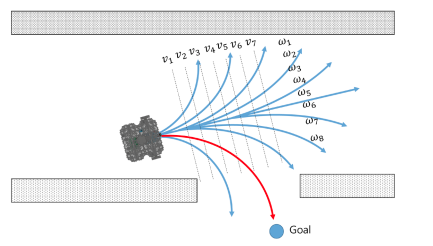
In the dynamic window, the objective function G(v, w) is used to calculate the translational velocty v and the rotational velocity w that maximizes the objective function which considers the direction, velocity and collision of the robot. With plotting, we can find optimal velocity among various v and w options to destination.
Previous Next

© Copyright . Revision 92dce270.

Built with Sphinx using a theme provided by Read the Docs.